Edit a bill (the right way under GST)
Correct a wrong name, rate, nights or item. A corrected bill replaces the old one, and every edit is logged.
Open the bill under Bills and press Edit bill.
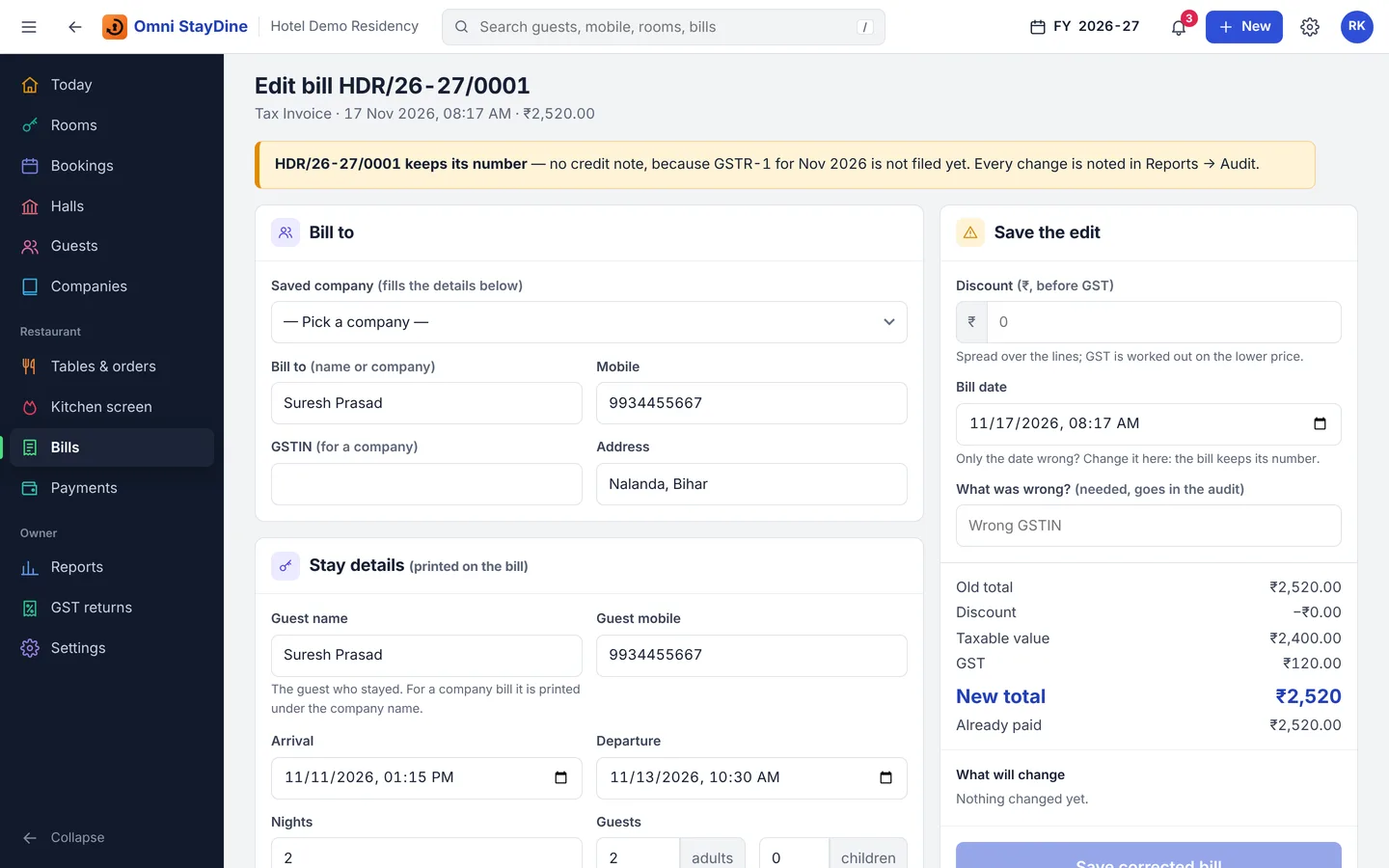
What you can correct
- Guest name, mobile, address, GSTIN (bill to).
- Stay details: arrival, departure, nights, guests, and Sell as another room type.
- Lines: rate, quantity, add a missed item (Add a line) or remove a wrong one.
- Discount and bill date.
Steps
- Make the changes. Press Enter to move to the next box.
- Check What will change: old total, new total and each change.
- What was wrong? is filled for you from the changes; adjust it if needed.
- Press Save corrected bill (or Ctrl + S).
How an edit works under GST
The yellow box at the top tells you which of these two applies:
- GSTR-1 for that month not filed yet: the bill keeps its number and is corrected. No credit note is needed.
- GSTR-1 already filed: the bill cannot be changed. When you save, it is cancelled with a credit note and a corrected bill is made with the next number. Payments move to the new bill.
Either way, every change is noted with who made it and why, in Reports → Bill edits and the audit.
Only the date is wrong? Change the date alone: the bill keeps its number.